

An EMI calculator India tool estimates your monthly instalment, but its real value is in testing scenarios before you borrow. Change the tenure, the interest rate or a prepayment, then read the full cost of each version. This guide walks through that process step by step, so you can judge whether a loan fits your budget. All figures in the examples are illustrative and were computed for this page.
How do you use an EMI calculators India tool in five steps?
The process below turns a calculator from a quick answer into a decision tool. Each step adds one piece of information, so the result becomes more useful as you go.
- Enter the figures from one real offer, including the loan amount, the rate and the tenure.
- Change only the tenure, and note how the EMI and the total interest move together.
- Change only the rate across a realistic range, and see how much each step matters.
- Add a prepayment you could actually make, and check whether your lender reduces the EMI or the tenure.
- Read the amortisation view, compare the total outflow with other offers, and test the EMI against your take-home pay.
What should you enter into an EMI calculator India tool first?
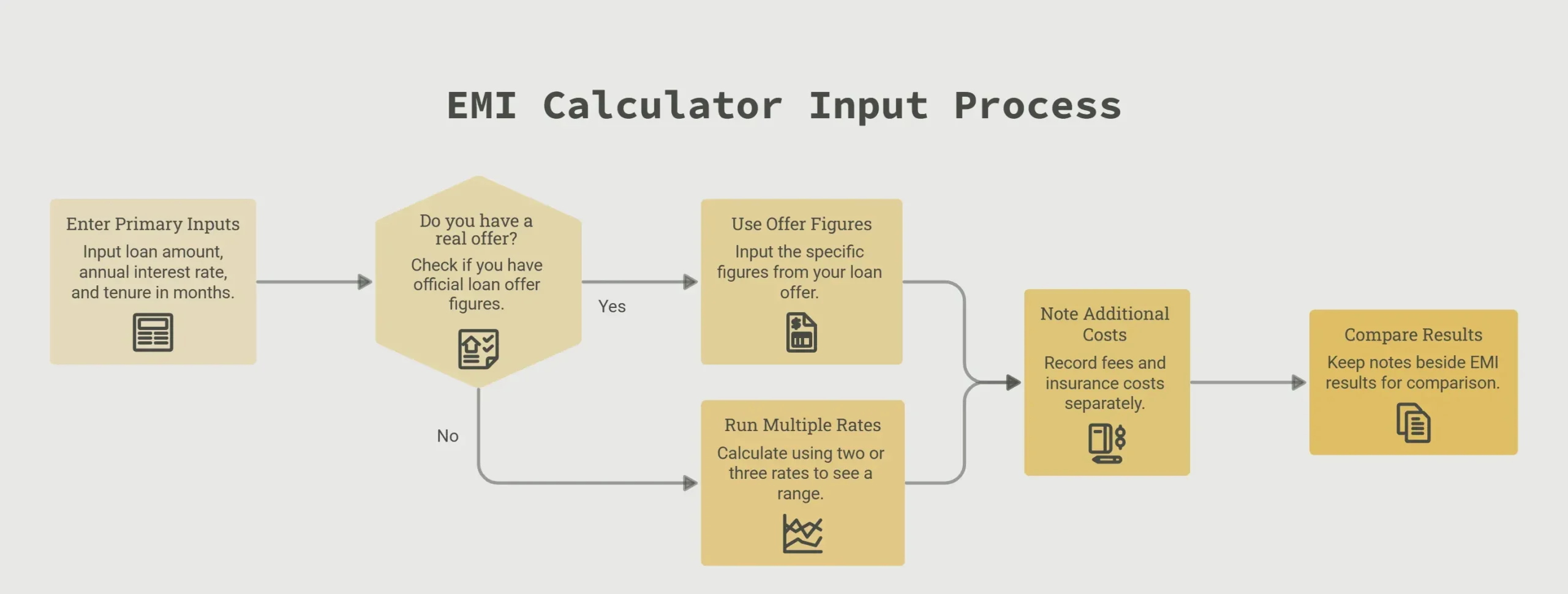
Start with three inputs: the loan amount, the annual interest rate and the tenure in months. Use the figures from a real offer if you have one. If you do not have an offer yet, run the calculator with two or three rates, so you see a range instead of a single answer.
Keep a separate note of the costs the calculator does not ask for, such as fees and insurance. These change what you actually pay, and a later section covers them in detail. Keep the note beside the EMI result so the numbers stay together when you compare.
How do you test tenure, rate and prepayment scenarios?
Change one input at a time, so you can see what each one does on its own. The table below keeps the loan at Rs 5,00,000 and compares three versions. The 10.5 per cent and 11.5 per cent rates are illustrative and are not an offer from any lender.
| Scenario | Monthly EMI | Total interest | Total repaid |
|---|---|---|---|
| 60 months at 10.5 per cent | Rs 10,747 | Rs 1,44,817 | Rs 6,44,817 |
| 84 months at 10.5 per cent | Rs 8,430 | Rs 2,08,148 | Rs 7,08,148 |
| 60 months at 11.5 per cent | Rs 10,996 | Rs 1,59,778 | Rs 6,59,778 |
Example inputs: loan of Rs 5,00,000, reducing balance, EMI calculated with the standard formula. Illustrative only.
The rate is the second lever. Moving from 10.5 per cent to 11.5 per cent on the same 60 month loan raises the EMI by about Rs 249 a month. It also adds about Rs 14,961 of interest over the loan. A single percentage point looks small on a screen, but over several years it is a large sum.
What does a longer tenure actually cost you?
The 84 month version lowers the EMI by about Rs 2,317 a month compared with the 60 month version. Over the full loan, the same example adds about Rs 63,331 of interest. The lower instalment gives real monthly room, but you pay for it across two more years of repayment.
Ask yourself which number you will feel more: the monthly EMI or the total you hand over at the end. Both matter, and the calculator shows both if you read the total interest line as carefully as the EMI line.
How do you test a prepayment?
Next, add a lump sum. In the same 60 month example at 10.5 per cent, a prepayment of Rs 50,000 at the end of month 12, with the EMI kept unchanged, would close the loan about seven months earlier. The interest saved in that case is roughly Rs 24,000.
Whether a prepayment reduces the EMI or shortens the tenure depends on the lender’s policy. Some calculators let you model both options, but the choice that applies to you is the one your lender confirms in writing. Some lenders also charge for prepayment, which a basic calculator does not include.
How do you read the amortisation view?
An amortisation view is a month by month table. It splits each EMI into an interest part and a principal part, and it shows the balance left after each payment. Open it after you have chosen a scenario, because it shows how quickly the balance actually falls.
Start with the first year. In the 60 month example at 10.5 per cent, the first twelve EMIs add up to about Rs 1,28,963. Of that, roughly Rs 48,711 is interest and Rs 80,253 reduces the loan. The balance after twelve payments is about Rs 4,19,747, which means more than 80 per cent of the original loan is still outstanding after a year.
Use this view to decide whether a prepayment is worth making. Early in a reducing balance loan, most of each EMI is interest, so a lump sum paid in the first year usually saves more interest than the same sum paid later. Check the schedule your lender gives you, because its figures are the ones that govern your loan.
How do you compare loan offers side by side?
Put each offer in its own row and compare the total amount you will pay, not only the EMI. A lower monthly figure can still cost more over the life of the loan. The table uses three illustrative offers on the same Rs 5,00,000 loan. The Rs 10,000 processing fee in Offer A is an assumption made for this example.
| Offer | Rate and tenure | Monthly EMI | Total interest | Fees | Total outflow |
|---|---|---|---|---|---|
| Offer A | 10.5 per cent, 60 months | Rs 10,747 | Rs 1,44,817 | Rs 10,000 | Rs 6,54,817 |
| Offer B | 11.5 per cent, 60 months | Rs 10,996 | Rs 1,59,778 | Rs 0 | Rs 6,59,778 |
| Offer C | 10.5 per cent, 84 months | Rs 8,430 | Rs 2,08,148 | Rs 10,000 | Rs 7,18,148 |
Total outflow is all EMIs added to the fees. Offer A: Rs 6,44,817 plus Rs 10,000 gives Rs 6,54,817. Illustrative only.
Offer A has the lowest total outflow in this table, although it carries a fee. Offer B has a higher rate but no fee, and it ends up about Rs 4,961 more expensive than Offer A. The fee narrows the gap without reversing it. Offer C has the lowest EMI, but its total outflow is about Rs 63,331 higher than Offer A.
Compare offers on the same loan amount and the same tenure where you can. If the tenures differ, the total outflow column is the fair comparison, because it counts every rupee you pay.
How do you check whether an EMI fits your take-home pay?
Start from take-home pay, which is the amount that reaches your bank account after deductions. Subtract your fixed costs, such as rent, food, school fees, existing loan EMIs and minimum payments on any card. What remains is the room you have for a new EMI, before any savings goal.
Short term instalment products carry their own charges too. Our guide to buy now, pay later plans in India explains how they differ from a term loan. For example, with a take-home pay of Rs 60,000, a new EMI of Rs 10,747 would take about 18 per cent of your monthly income. Whether that works depends on everything else on your list. If you already repay Rs 15,000 a month on another loan, the new EMI sits on top of that payment, not in place of it.
Run the check twice. First use your usual take-home pay, then use a lower figure that you would still consider a bad month. If the EMI still fits the lower figure, the loan is less likely to strain your budget when something unexpected happens.
Keep a buffer as well. A monthly EMI is due whether or not your income arrives on time that month, so test the figure against a lower income as well as your usual one.
What does an EMI calculator India tool leave out?
A calculator works only with the numbers you enter. It usually does not know about the fees and add-ons that a lender charges separately or adds to the loan. These items change the true cost, so read the lender’s schedule of charges before you decide. Where you need a firm figure, ask the lender to confirm it in writing.
When you ask for the figures, request four things: the monthly EMI, the total interest, the total amount payable over the loan, and the amount, if any, that will be deducted before the money reaches you. Compare those four numbers with your calculator result, line by line.
| Item left out | How it changes your cost | Where to check it |
|---|---|---|
| Processing fee | Adds to the total you pay, and may be deducted before the money reaches you | Schedule of charges and key fact statement |
| Insurance or other add-ons | Adds a one-time or monthly cost if you accept it | Loan offer letter and schedule of charges |
| Prepayment charge | Raises the cost of closing or part paying the loan early | Loan agreement and schedule of charges |
| Penal charge on a missed EMI | Applies when a payment is late or missed | Loan agreement and schedule of charges |
| Change in rate | If the rate can change after you sign, later EMIs may differ from the calculator result | Loan agreement |
| Taxes on fees | May be added on top of the fee amounts shown | Schedule of charges |
On missed payments, the rule matters. The Reserve Bank of India requires a penalty on a loan account to be a flat penal charge, and it cannot be compounded into interest. Ask your lender to show that charge in the schedule before you accept the loan.
For digital loans, the Reserve Bank’s Digital Lending Directions, 2025 include a key fact statement. Ask your lender for it and compare the charges it lists with your calculator result. If the two do not match, ask the lender to explain the difference before you sign.
If you have tested several scenarios and are now weighing high interest credit card debt against a fixed EMI, BillCut is one option to look at. BillCut is a debt refinancing platform that helps Indian borrowers convert high interest credit card debt into structured EMIs. You can see how it works on the BillCut homepage.
How can you check a lender before you accept an offer?
Before you sign, confirm that the lender is registered. The Reserve Bank’s Sachet portal lets you check whether an entity is registered, and it is also the place to report illegal lending or money collection. Use it for any app or company you have not dealt with before. If the offer comes from a peer-to-peer platform, read whether P2P lending is safe in India before you compare it.
If a regulated lender does not address a concern, you can file a complaint through the Reserve Bank’s Complaint Management System. If the complaint is still not resolved, the Integrated Ombudsman Scheme gives a route to escalate a complaint against a bank or NBFC.
Keep copies of the loan offer, the schedule of charges and every message about your loan. A complete record makes a complaint easier to pursue and helps you check the statements you receive. If you want to understand the credit report that lenders review, see how credit bureaus work in India.
Does BillCut fit a credit card debt problem?
This section describes BillCut, which is a provider in the debt refinancing category discussed in this guide. The scenario method above works for any loan, but credit card debt raises a specific question: can a structured EMI replace high interest revolving balances at a lower total cost? BillCut helps Indian borrowers explore that option by converting high interest credit card debt into structured EMIs.
Lower interest is not guaranteed. The rate and tenure you receive depend on your profile and on the terms the lender sets, and BillCut does not promise a particular rate, approval or saving. If you look at a BillCut structure, run it through the same steps in this guide: enter the rate, tenure and every fee, then compare the total outflow with what your card balance would cost over the same period.
A structured EMI has a fixed end date, which is useful for planning. It also commits you to a monthly payment that is due even in a tight month, so the affordability check matters as much as the rate. A missed EMI can attract a penal charge, as described earlier, so a payment you cannot sustain is a real risk, not a formality.
Who should and who should not rely on this approach?
An EMI calculator used this way suits some borrowers better than others. It is most useful when you are comparing two or more real offers and want to see the full cost before you commit.
- You are comparing two or more offers on the same loan amount and want to see total outflow, not only the EMI.
- You know your take-home pay and your fixed monthly costs, so you can test the EMI against your actual budget.
- You are willing to read the schedule of charges and key fact statement before you sign.
It is less useful if you use it alone in the following cases:
- You have no written offer yet, so the inputs are guesses and the result is only a rough range.
- Your income varies from month to month and you cannot be sure you will meet a fixed EMI on time.
- You want a personal opinion on whether borrowing is right for you. This guide explains the mechanics only and is not personal financial advice. A licensed financial adviser can review your full position.
Frequently Asked Questions
-
Is an EMI calculator accurate?
An EMI calculator gives an estimate based on the loan amount, rate and tenure you enter. Your lender’s schedule is the final figure, because fees, rounding and any rate changes can differ from a basic calculation.
-
Does a longer tenure always mean a lower total cost?
No. A longer tenure lowers the monthly EMI but usually increases the total interest you pay over the life of the loan. Compare the total outflow column, not only the EMI.
-
Does a prepayment reduce the EMI or the tenure?
It depends on the lender’s policy. Some lenders reduce the EMI and others shorten the tenure, so ask which option applies to your loan and get the answer in writing.
-
Should the processing fee be included in the calculator?
The calculator will not add it automatically, so add it yourself as a separate cost. Compare the total outflow of each offer, which is the EMIs plus the fees.
-
Does an EMI calculator show insurance costs?
Usually not. If a lender offers an insurance add-on, check the loan offer letter and the schedule of charges for its cost and whether it is optional.
-
Can an EMI calculator tell me whether I can afford a loan?
It shows the monthly instalment only. Whether you can afford it depends on your take-home pay, fixed costs and other EMIs, so subtract those from your income before you decide.
-
What is a key fact statement for a loan?
For digital loans, the Reserve Bank’s Digital Lending Directions, 2025 require a key fact statement. It sets out the key terms and charges, so compare it with your calculator result before you sign.
-
What happens if I miss an EMI?
A penal charge may apply. Under Reserve Bank of India rules for loan accounts, a penalty must be a flat penal charge and cannot be compounded into interest. Contact your lender promptly and ask for the charge in writing.
-
How do I check whether a lender is registered?
You can check the registration of an entity on the Reserve Bank’s Sachet portal. The same portal is used to report illegal lending or money collection.
-
Where can I complain about a bank or NBFC?
You can file a complaint through the Reserve Bank’s Complaint Management System. If it is not resolved, the Integrated Ombudsman Scheme provides an escalation route against a bank or NBFC.
Are you still struggling with higher rate of interests on your credit card debts? Cut your bills with BillCut Today!